Google Antigravity Pro ready-made account
¥28Sold out
Before you buy
- Delivery time
- Delivered automatically after payment is confirmed
- Warranty
- CoveredSee the product detailsNot coveredSee the product details
- Option
- Covers first login (within 6 hours of receipt)
- Delivery format
- Account details and login instructions, view on the order page or receive via Telegram after payment is confirmedScan the code on the order page or open it on your phone; you can also link Telegram to receive it
These four points are everything this product promises. Placing an order means you have read them; no refunds for disputes caused by not reading them. Issues covered by the warranty are handled as usual.
Before you buy
- Delivery time
- Delivered automatically after payment is confirmed
- Warranty
- CoveredSee the product detailsNot coveredSee the product details
- Option
- US-region account; covers first login (within 6 hours of receipt)
- Delivery format
- Account details and login instructions, view on the order page or receive via Telegram after payment is confirmedScan the code on the order page or open it on your phone; you can also link Telegram to receive it
These four points are everything this product promises. Placing an order means you have read them; no refunds for disputes caused by not reading them. Issues covered by the warranty are handled as usual.
Before you buy
- Delivery time
- Delivered automatically after payment is confirmed
- Warranty
- CoveredSee the product detailsNot coveredSee the product details
- Option
- Covers first login; if the membership drops, covered for 1 month
- Delivery format
- Account details and login instructions, view on the order page or receive via Telegram after payment is confirmedScan the code on the order page or open it on your phone; you can also link Telegram to receive it
These four points are everything this product promises. Placing an order means you have read them; no refunds for disputes caused by not reading them. Issues covered by the warranty are handled as usual.
Before you buy
- Delivery time
- Delivered automatically after payment is confirmed
- Warranty
- CoveredSee the product detailsNot coveredSee the product details
- Option
- Covers first login; if the membership drops, covered for 3 months
- Delivery format
- Account details and login instructions, view on the order page or receive via Telegram after payment is confirmedScan the code on the order page or open it on your phone; you can also link Telegram to receive it
These four points are everything this product promises. Placing an order means you have read them; no refunds for disputes caused by not reading them. Issues covered by the warranty are handled as usual.
Before you buy
- Delivery time
- Delivered automatically after payment is confirmed
- Warranty
- CoveredSee the product detailsNot coveredSee the product details
- Option
- Covers first login; if the membership drops, covered for the full term
- Delivery format
- Account details and login instructions, view on the order page or receive via Telegram after payment is confirmedScan the code on the order page or open it on your phone; you can also link Telegram to receive it
These four points are everything this product promises. Placing an order means you have read them; no refunds for disputes caused by not reading them. Issues covered by the warranty are handled as usual.
How it is delivered
- Choose option
- Pay
- Payment confirmed
- Pick up on the web / Telegram
How to use itImporting a credential
- Open account manager
- Choose Token
- Paste
- Confirm
- Check status
The animation could not load — just follow the steps above.
Full details (23 items)
Product details
- Product type
- Google ready-made account with Google AI Pro membership already activated; can be used directly for Antigravity, set up and ready to use out of the box.
- This option
- Covers first login (within 6 hours of receipt)
- This option
- US-region account; covers first login (within 6 hours of receipt)
- This option
- Covers first login; if the membership drops, covered for 1 month
- This option
- Covers first login; if the membership drops, covered for 3 months
- This option
- Covers first login; if the membership drops, covered for the full term
- Membership duration
- Membership comes from official promotions such as Pixel (nominally about 12 months), Jio (nominally about 18 months), and the source cannot be specified. Actual remaining time may be less than 12 months (e.g., only 7–8 months left); it is not guaranteed to have 12 or 18 months.
- Validity
- Subject to the actual membership expiration date of the account.
- Environment notes
- Normal membership and activation status does not mean it works properly on every client, in every region, and under every network environment.
Delivery & use
- Delivery time
- Delivered automatically after payment is confirmed
- What you receive
- Account credentials and login instructions. After payment confirmation, view on the order page or receive via Telegram.
- Download the app
- Open github.com/lbjlaq/Antigravity-Manager/releases/tag/v5.0.0 in a computer browser. The page is very long; scroll to the bottom, download the version for your computer system and install it, then import the account as described below.
- Import into the app
- In Antigravity Tools, go to "Account Management", click the "+" to add an account, select "Refresh Token", paste the account info sent to you, then click "Confirm Add". You can paste multiple tokens or a JSON array at once for bulk import.
- Image
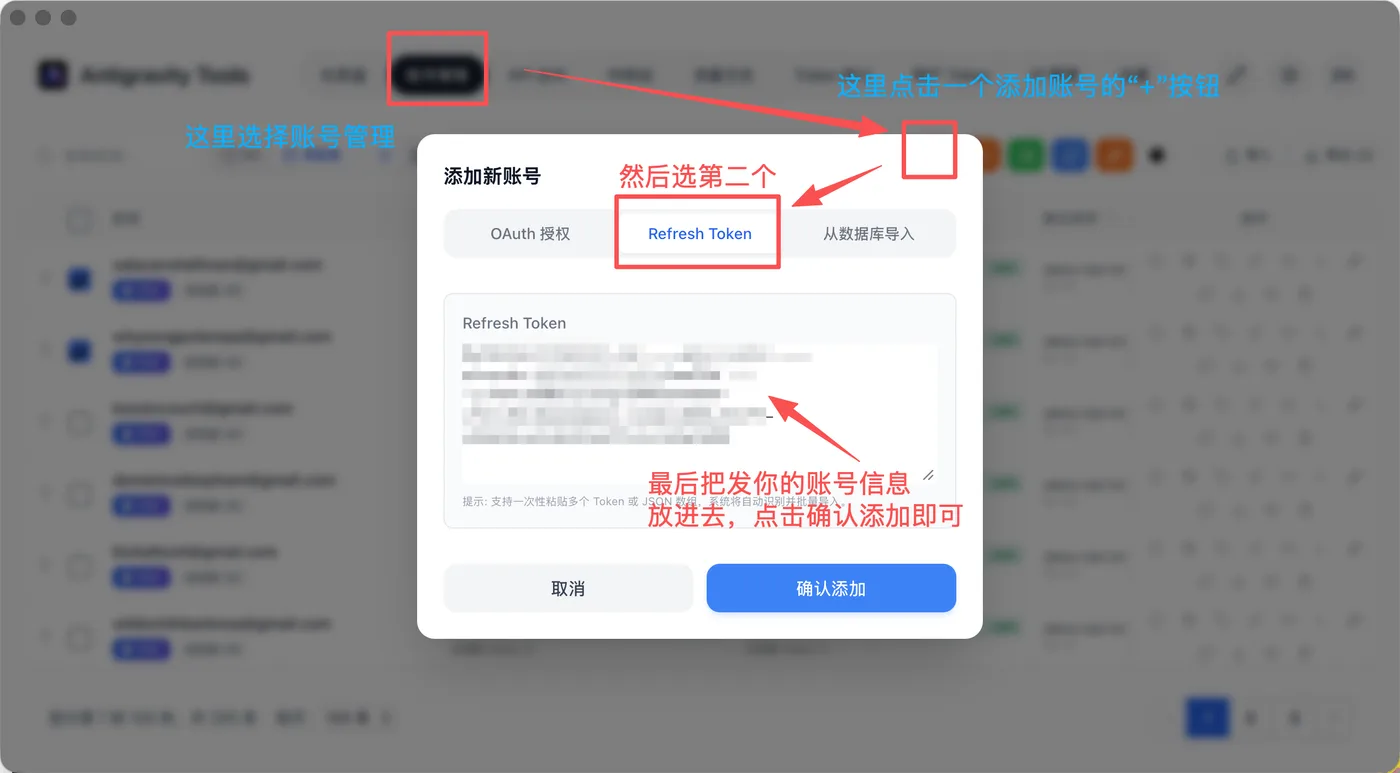
- Check status
- After delivery, first check the membership and activation status with a trusted checking tool; do not judge only by client errors. If the credential fails to import or you see errors such as 403, keep the full error message and contact customer support to verify.
- Shows Free
- Age verification may be required; please verify according to Google's official requirements.
- Security settings
- Do not change important information until you confirm the status is normal; after confirming, promptly change the password and enable 2FA. You may not be able to change them right after login and may need to wait one to several days.
- Usage habits
- Use a fixed device and stable network as much as possible, stay logged in, and do not repeatedly log in and out within a short time.
- Login notice
- Do not log in directly with your Google account password: logging in from a different location can easily trigger Google risk control, and authorizing Antigravity after logging in is even more likely to trigger risk control. Once risk control is triggered, you usually need to wait nearly 1 week. Please import using the software according to the delivery instructions. Risk control or authorization failure caused by logging in directly with your Google account is not covered by after-sales support. For third-party tools involving authorization credentials, please confirm the source is trustworthy.
- Login notice
- Please import and use according to the delivery instructions. Authorization failure caused by logging in directly to Antigravity with your Google account is not covered by after-sales support. For third-party tools involving authorization credentials, please confirm the source is trustworthy.
Warranty and after-sales
- First-login warranty
- Within 6 hours after receipt, we only handle two types of issues: credential import failure and quota already used up. All other issues are not covered by the first-login warranty. Problems that occur after 6 hours are not covered by the first-login warranty. If you don't have time to verify the account immediately, we recommend buying when you do.
- First-login warranty
- Within 6 hours after receipt, if the account cannot be used normally on first login, you can contact customer support to verify and handle it. Problems that occur after 6 hours are not covered by the first-login warranty. If you don't have time to verify the account immediately, we recommend buying when you do.
- Subscription drop warranty
- This option has no membership-drop warranty; for longer coverage, choose an option with a warranty of 1 month or more
- Subscription drop warranty
- Within 1 month of purchase, if a membership that was working suddenly drops, you can request after-sales support
- Subscription drop warranty
- Within 3 months of purchase, if a membership that was working suddenly drops, you can request after-sales support
- Subscription drop warranty
- Within the subscription validity period, if your previously working subscription suddenly drops, you can request after-sales support.
- Covered by after-sales
- Within 6 hours of receipt: the credential fails to import, or the quota is already used up (once confirmed as a delivery problem). After 6 hours, these two problems are no longer handled
- Covered by after-sales
- Within 6 hours of receipt: the credential fails to import, or the quota is already used up (once confirmed as a delivery problem). After 6 hours, these two problems are no longer handled. Membership drops during the warranty period are handled under "Subscription drop warranty" above
- Covered by after-sales
- Within 6 hours of receipt: the credential fails to import, the quota is already used up, or what was delivered does not match the description (once confirmed as a delivery problem). After 6 hours, these problems are no longer handled
- Not covered by warranty
- CAPTCHA, phone verification or age verification; bans during use; being unable to log in again after a successful first login; being unable to change the password or 2FA; Antigravity authorization failures or client errors; network, IP or region restrictions; getting into the app but hitting chat errors or model problems; problems with third-party tools themselves; problems caused by changing account details yourself; anything after the warranty period
- Technical support
- The warranty does not include teaching you how to set things up. We do not provide software installation guidance, node or TUN network setup, or troubleshooting for region restrictions and client errors; for these, see guides on GitHub, Linux.do, Xiaohongshu and similar platforms
Notes
- Account risk
- Ready-made accounts pass through multiple channels and may be recovered by the original holder or may be subject to platform batch security checks. Please understand these risks before purchasing.
- Official promotions
- Benefits and usage conditions for promotions such as Pixel and Jio may change with official policies. If a promotion ends or policies change significantly, handling will be subject to official rules.
- High-value use
- After the first login works normally, risks from using it for high-value purposes such as topping up memberships or linking important services are your own responsibility.