GPT Plus ready-made account
¥78/mo
Before you buy
- Delivery time
- Delivered automatically after payment is confirmed
- Warranty
- CoveredIf banned in normal use or the membership stops working, we refund the remaining days minus ¥20, no replacement; if the first-login password is wrong, report it with screenshots within 1 hour for us to checkNot covered2FA code errors, being logged out because 2FA was changed more than 1 minute after login, theft because 2FA was not changed, phone-number verification, and "device limit reached" messages are all not covered
- Option
- Plus ready-made account, 1 month
- Delivery format
- Account details + login instructions, view on the order page or receive via TelegramScan the code on the order page or open it on your phone; you can also link Telegram to receive it
These four points are everything this product promises. Placing an order means you have read them; no refunds for disputes caused by not reading them. Issues covered by the warranty are handled as usual.
How it is delivered
- Choose option
- Pay
- Payment confirmed
- Pick up on the web / Telegram
How to use itLogging in to a ready-made account
- Receive the account
- Enter email and password
- Get the 2FA code
- Enter it to log in
- Replace the 2FA
The animation could not load — just follow the steps above.
Full details (28 items)
Product details
- Product type
- Ready-made account with ChatGPT Plus already activated, ready to use immediately.
- Pre-listing check
- Account, password, and 2FA have all been tested and working before listing.
- Validity
- 1 month
Delivery & use
- Delivery time
- Delivered automatically after payment is confirmed
- What you receive
- Account credentials and login instructions. After payment confirmation, view on the order page or receive via Telegram.
- What you receive
- Account, password and 2FA key; separators may vary
- Login steps
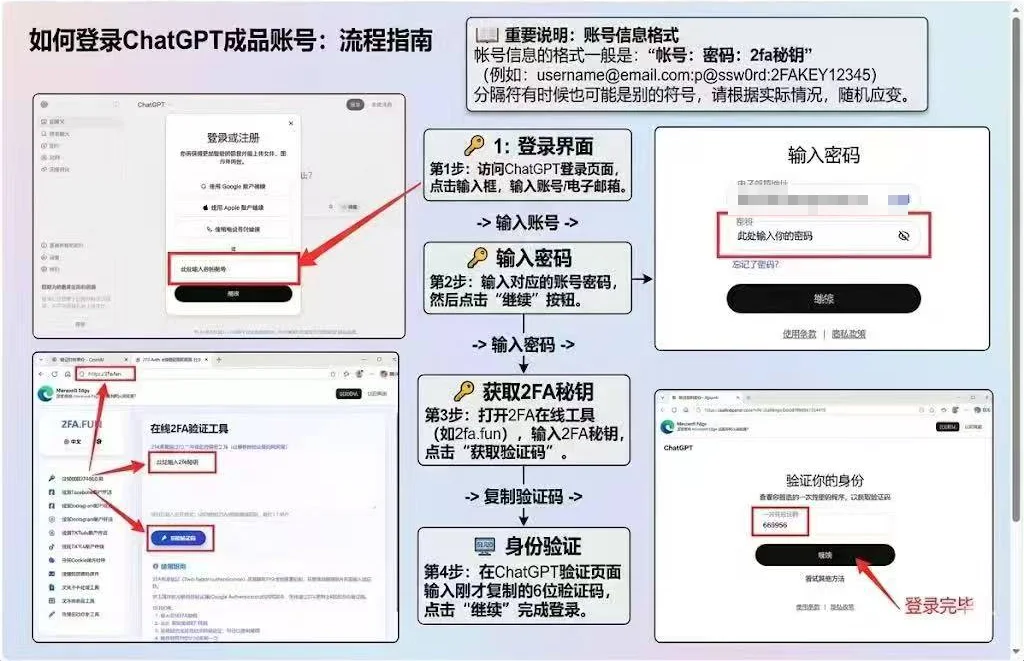
- ① On the ChatGPT login page, enter the email, then the password. ② If two-step verification is required, enter the 2FA key in a 2FA tool (such as 2fa.fun) to get a 6-digit code. ③ Enter the 6-digit code back into ChatGPT to finish logging in
- Image
- How to log in
- Log in to ChatGPT directly with the email and password. Do not tap "Continue with Google" — Google login will not work
- Change 2FA
- After receiving the account, change the 2FA immediately. From deleting the old 2FA to adding the new 2FA must be completed within 1 minute. If it times out, the account may be logged out, and logging in again may require an email verification code. We cannot provide the email verification code, and this is not covered by after-sales support. If the account is stolen because the 2FA was not changed promptly, it is also not covered by after-sales support.
- Phone verification
- When logging in to ChatGPT web or Codex, you may be asked to verify a phone number (Phone number required). OpenAI triggers this based on the login network, not the account, and it is not covered by after-sales support. The phone verification Codex asks for can be completed by buying "CodeX real-SIM SMS code" on this site, delivered automatically after payment; for ChatGPT web phone verification, it is not guaranteed to work
- Device limit
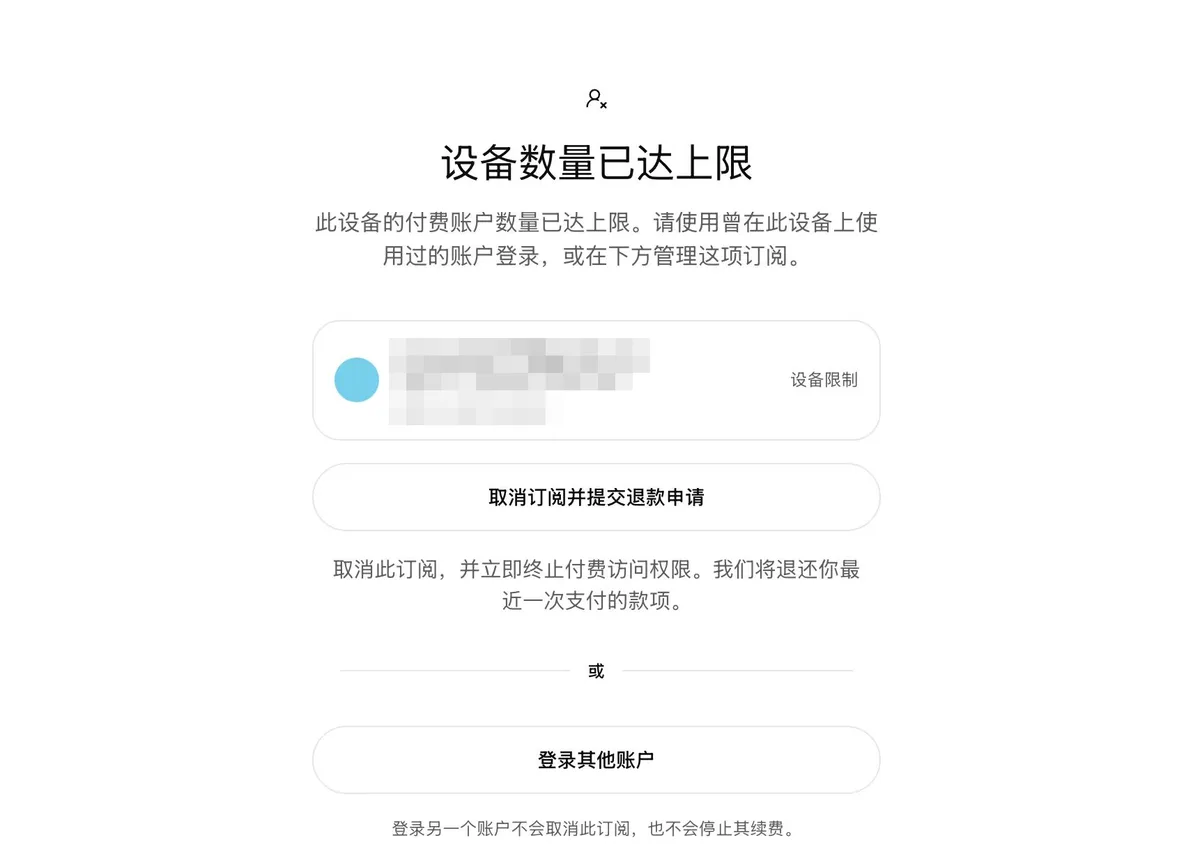
- If you see "Device limit reached" after login (as shown below), it is because too many ChatGPT paid accounts have been logged in on this device. This is unrelated to the account itself and is not covered by after-sales support. Please log in on another device, or reinstall the system on your computer before logging in.
- Image
Usage rules
- Risk control notice
- OpenAI has recently tightened risk controls and will ban accounts used improperly. Every rule below must be followed; account bans caused by improper use are not covered by after-sales support.
- Login devices
- Log in only on 1–2 of your own regularly used devices; do not log in on unfamiliar devices or public computers.
- Network region
- Use a fixed node in one country or region; do not switch countries or regions frequently, and do not use unstable or low-quality nodes.
- For your own use only
- Sharing, lending, or transferring the account is prohibited; do not give your account password or verification codes to anyone, and do not share the account on any platform.
- Request frequency
- Do not send a large number of repeated requests in a short time; using unofficial scripts or plugins for batch automated calls is prohibited.
- No reverse proxy
- Do not connect the account to a reverse proxy or relay, or use it as an API for programs or others to call.
- Quota
- Reselling or sharing any account quota is prohibited, including official free API credits.
- What you get
- Generating content involving politics, pornography, violence, infringement, or other illegal or rule-breaking content is prohibited.
- Official rules
- Strictly comply with OpenAI's official usage policies and terms of service.
Warranty and after-sales
- Pre-sale confirmation
- Before ordering, please read the login steps and login flow chart on this page and confirm you know how to log in; after payment, please screen-record the entire process from the redeem code popup to final login.
- Warranty coverage
- Abnormal bans and membership drops within 1 month, e.g. a ban for no apparent reason during normal use, or the membership suddenly stopping working
- How to get support
- Refund based on remaining warranty days; no account replacement.
- First login
- The account, password and 2FA were all tested and could log in before listing. Log in as soon as you receive it; after paying, screen-record the whole process from when the code pops up to the final login. If the password or 2FA is wrong on your first login, contact support with the complete screen recording — the recording is the only proof accepted for after-sales on wrong account details, and without a video there is no after-sales support. If we confirm it is a delivery problem, we refund according to the warranty above (minus a ¥20 fee) and do not replace the account; for other login problems such as 2FA code errors, see "Not covered by after-sales" below
- Refund calculation
- Refund = amount paid ÷ 30 × remaining days − ¥20 fee; even if the membership drops on the first day, the ¥20 fee is still deducted. If you mind, do not order
- Not covered by after-sales
- The account, password and 2FA were all tested and working before delivery. The following are caused by your own actions or usage environment and are not covered by after-sales support: 2FA code errors at login; being logged out or asked for an email code because the 2FA change was not finished within 1 minute; theft because the 2FA was not changed in time; being asked to verify a phone number when logging in to ChatGPT web or Codex; and "device limit reached" after logging in. Before logging in, check the 2FA key and sync your device clock