
Suno Premier top-up
¥221/mo
Before you buy
- Delivery time
- Delivered automatically after payment is confirmed; shown as sold out when out of stock
- Warranty
- CoveredIf the subscription drops within 30 days of the top-up, we refund the difference for the remaining daysNot coveredAccount bans are not covered; redeem codes cannot be refunded 7 days after ordering
- Option
- Premier for 1 month via iOS on your own Suno account; only your user ID is needed
- Delivery format
- Redeem code + redeem URL, view on the order page or receive via TelegramScan the code on the order page or open it on your phone; you can also link Telegram to receive it
These four points are everything this product promises. Placing an order means you have read them; no refunds for disputes caused by not reading them. Issues covered by the warranty are handled as usual.
How it is delivered
- Choose option
- Pay
- Payment confirmed
- Pick up on the web / Telegram
How to use itEntering your account on the redeem page
- Enter code
- Enter account
- Start
- Wait
The animation could not load — just follow the steps above.
Full details (21 items)
Product details
- Product type
- Suno Premier one-month official subscription, iOS channel top-up; top up to your own Suno account with a redeem code. This is a top-up service, not a ready-made account.
- Validity
- 1 month
- Membership benefits
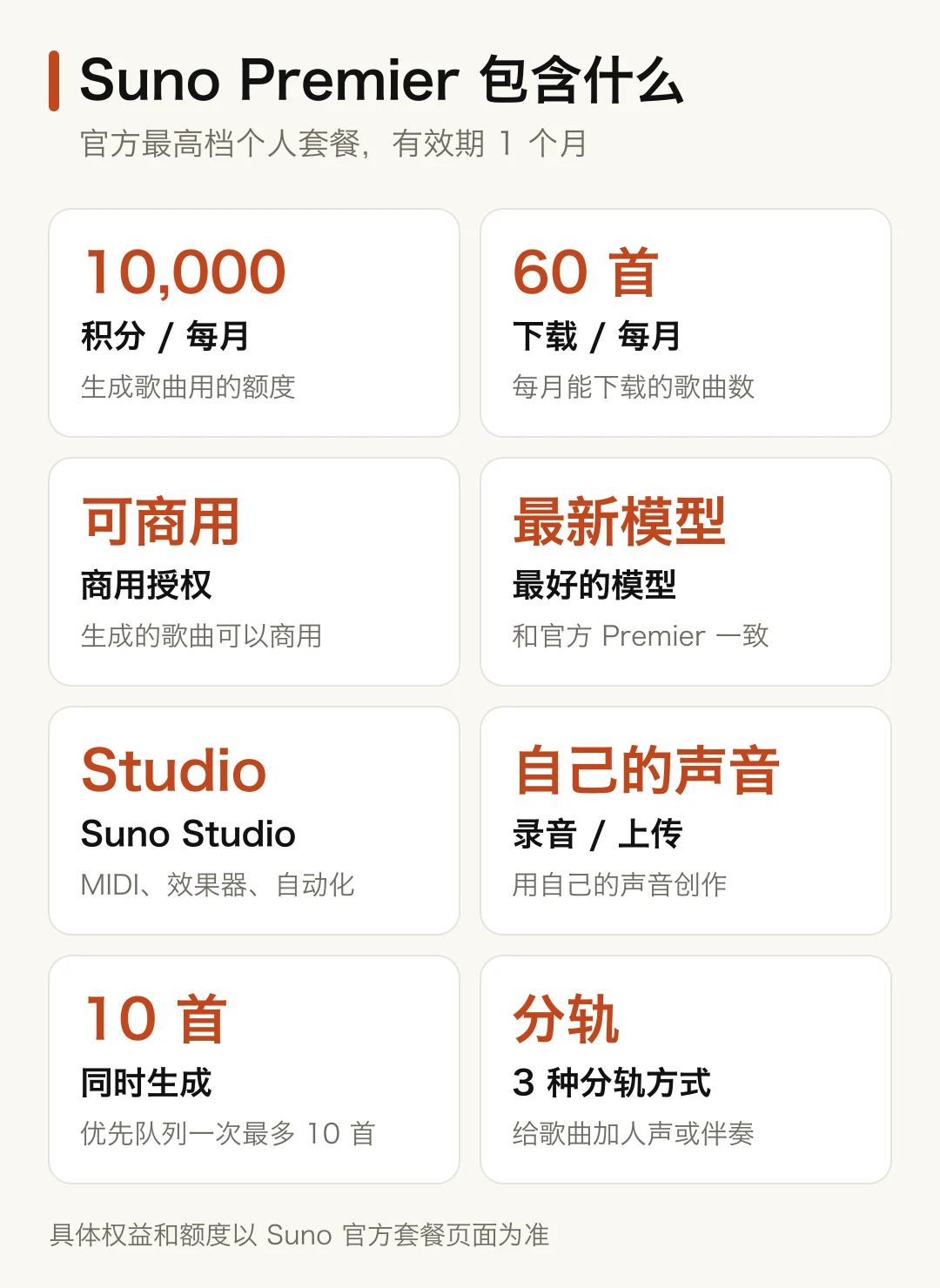
- Monthly 10,000 credits, 60 song downloads per month, commercial use of generated songs, the best official model, Suno Studio (MIDI, effects, automation), priority queue with up to 10 songs per generation, and the ability to create with your own voice. See the official Suno plan page for details.
- Download limit
- Premier includes up to 60 song downloads per month; even if you generate more songs than that, excess downloads must wait until the next month or be purchased as extra downloads in Suno.
- Image
- Redeem code
- Unused redeem codes do not expire; you can redeem them whenever you need.
Check before topping up
- User ID
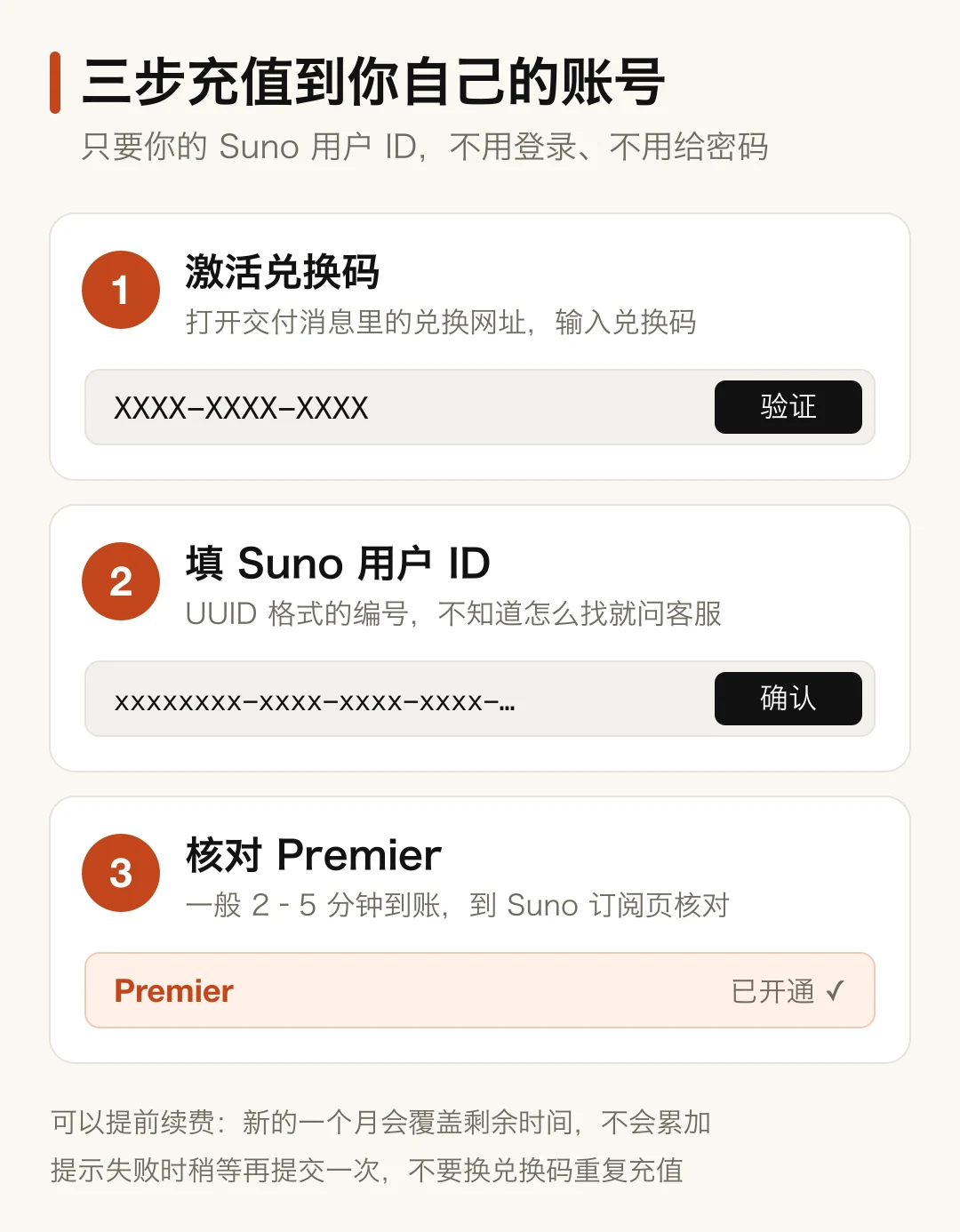
- Top-up only requires your Suno user ID (UUID format, like xxxxxxxx-xxxx-xxxx-xxxx-xxxxxxxxxxxx); no email, password, or verification code is needed. If you don't know your user ID, contact customer support with your order number.
- Renewal replaces remaining time
- You can renew early without waiting for the membership to expire; the new month replaces the remaining time and does not stack
- One code per account
- Do not use multiple redeem codes on the same account at the same time.
Delivery & use
- Delivery time
- After payment is confirmed, delivery is automatic. When temporarily out of stock, the product shows as sold out and will be restored after restocking.
- How to receive it
- After payment is confirmed and the redeem code is ready, scan the code on the order page to view it on your phone, or open the order page on your phone; you can also link Telegram to receive it.
- Step 1
- Open the redeem page, enter the redeem code, and click “Verify and continue”.
- Step 2
- Enter your Suno user ID and click “Confirm and upgrade”; only enter the user ID, do not paste any other login information.
- Step 3
- Usually arrives in 2–5 minutes. Log in to Suno and check the Premier status and expiry date on the subscription page.
- Image
- Top-up failed
- If it shows a failure, wait a moment and submit again. If it still doesn't work, contact customer support with your order number from this site. Do not use another redeem code to top up the same account repeatedly.
- Network
- Bring your own; this product does not include an IP or proxy
Warranty and after-sales
- Warranty
- If the subscription drops within 30 days of the top-up, we refund the difference for the remaining days
- Bans
- Account bans are not covered by warranty. Bans are mostly related to the account itself, such as bulk-registered accounts, shared accounts, frequent IP changes, and asking or translating sensitive content.
- After-sales
- Contact customer support with your order number, top-up time, and subscription page screenshot.
Notes
- Refunds and replacements
- Redeem codes cannot be refunded 7 days after ordering; please buy only as needed. The redeem code is your credential; do not share or forward it.